
Summary
VLANs provide the possibility to isolate devices into different Layer2 segments while still using the same Layer1 medium. This is very useful in setups where you want to separate different types of devices of users. This feature is also very useful for Wireless setups since you can isolate different Virtual APs and restricting access to certain services or networks by using Firewall. Below is an example with a setup with two Access Points on the same device that isolates them into saparate VLANs. This kind of scenario is very common when you have a Guest AP and Work AP.
Example
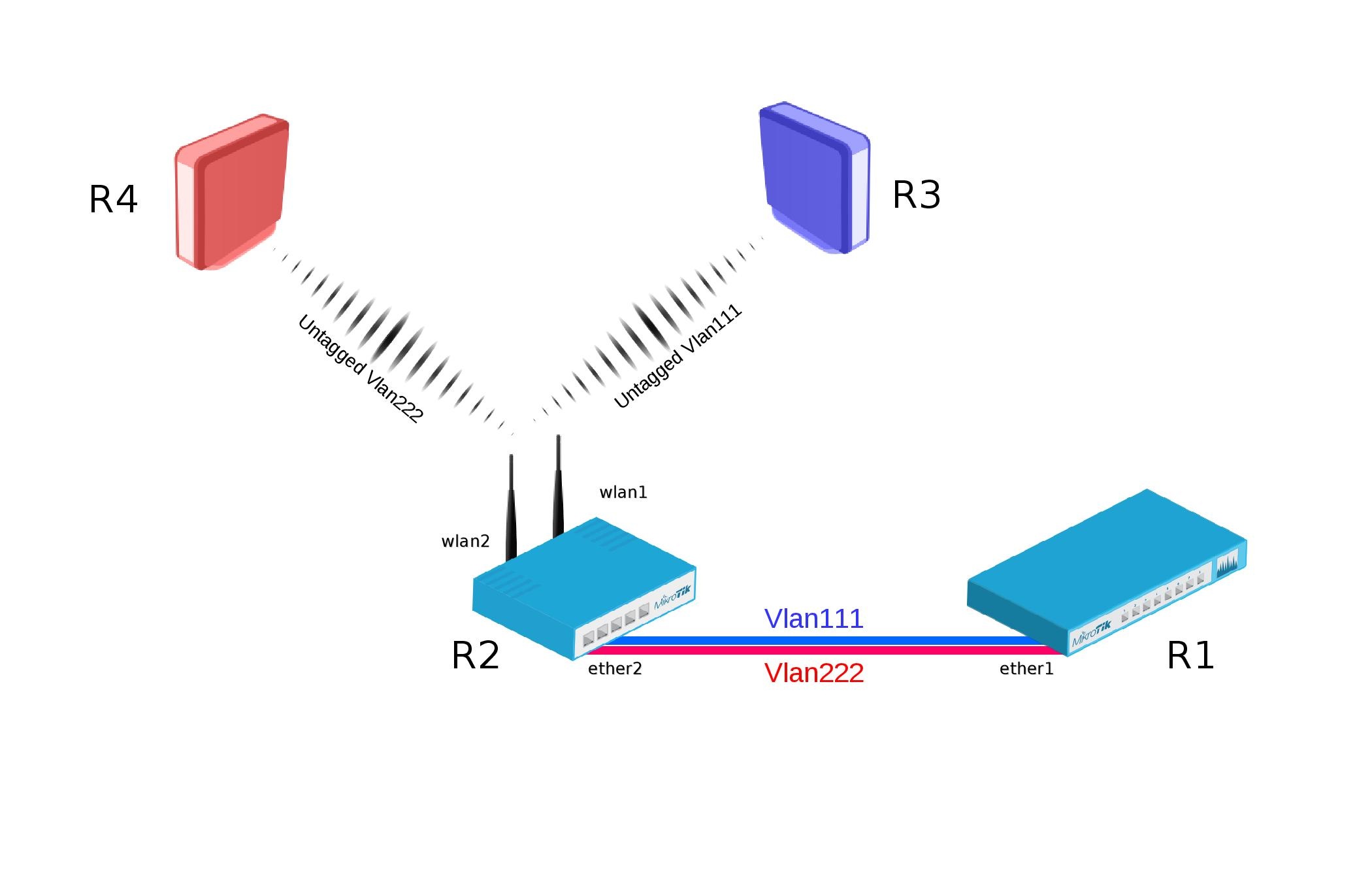
Bridge VLAN Filtering since RouterOS v6.41 provides VLAN aware Layer2 forwarding and VLAN tag modifications within the bridge.
R1:
- Add necessary VLAN interfaces on ethernet interface to make it a VLAN trunk port. Add ip addresses on VLAN interfaces.
[admin@R1] >
/interface vlan
add interface=ether1 name=vlan111 vlan-id=111
add interface=ether1 name=vlan222 vlan-id=222

/ip address
add address=192.168.1.1/24 interface=vlan111
add address=192.168.2.1/24 interface=vlan222
R2:
- Add VirtualAP under wlan1 interface and create wireless security-profiles for wlan1 and wlan2
[admin@R2] >
/interface wireless
set [ find default-name=wlan1 ] disabled=no mode=ap-bridge security-profile=vlan111 ssid=vlan111 vlan-id=111 vlan-mode=use-tag
add disabled=no master-interface=wlan1 name=wlan2 security-profile=vlan222 ssid=vlan222 vlan-id=222 vlan-mode=use-tag
It is important to set wlan1,wlan2 vlan-mode to "use-tag".
- Create bridge with vlan-filtering=yes
- Add necessary bridge ports
- Add tagged interfaces under interface bridge vlan section with correct vlan-ids
[admin@R2] >
/interface bridge
add fast-forward=no name=bridge1 vlan-filtering=yes

/interface bridge port
add bridge=bridge1 interface=ether2
add bridge=bridge1 interface=wlan1
add bridge=bridge1 interface=wlan2
/interface bridge vlan
add bridge=bridge1 tagged=ether2,wlan1 vlan-ids=111
add bridge=bridge1 tagged=ether2,wlan2 vlan-ids=222
Some devices have a built-in switch chip that can switch packets between Ethernet ports with wire-speed performance. Bridge VLAN filtering disables hardware offloading for certain devices, which will prevent packets from being switched, this does not affect Wireless interfaces as traffic through them cannot be offloaded to the switch chip either way.
VLAN filtering is not required in this setup, but is highly recommended due to security reasons. Without VLAN filtering it is possible to forward unknown VLAN IDs in certain scenarios. Disabling VLAN filtering does have performance benefits.
R3:
- Add IP address on wlan1 interface.
- Create wireless security-profile compatible with R2 wlan1.
[admin@R3] >
/ip address
add address=192.168.1.3/24 interface=wlan1

/interface wireless
set [ find default-name=wlan1 ] disabled=no security-profile=vlan111
R4:
- Add IP address on wlan1 interface.
- Create wireless security-profile compatible with R2 wlan2.
[admin@R4] >
/ip address
add address=192.168.2.4/24 interface=wlan1

/interface wireless
set [ find default-name=wlan1 ] disabled=no security-profile=vlan222