
CRS112-8P-4S-IN
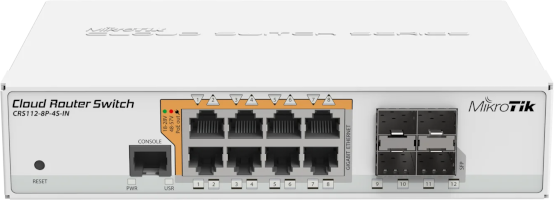
The CRS112 is a network switch with eight-gigabit Ethernet ports and four SFP ports. It is already configured, with all ports switched together. We recommend you to set up a password to secure your device. This unit is compatible with 1.25G SFP modules. The CRS112-8P is capable of powering other devices through PoE.
Safety Warnings
Before you work on any equipment, be aware of the hazards involved with electrical circuitry, and be familiar with standard practices for preventing accidents.
Ultimate disposal of this product should be handled according to all national laws and regulations.
The Installation of the equipment must comply with local and national electrical codes.
This unit is intended to be installed in the rackmount. Please read the mounting instructions carefully before beginning installation. Failure to use the correct hardware or to follow the correct procedures could result in a hazardous situation to people and damage to the system.
This product is intended to be installed indoors. Keep this product away from water, fire, humidity or hot environments.
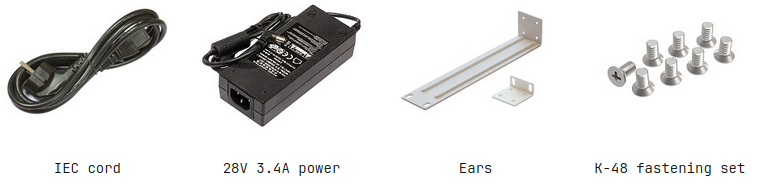
Use only the power supply and accessories approved by the manufacturer, and which can be found in the original packaging of this product.
Read the installation instructions before connecting the system to the power source.
We cannot guarantee that no accidents or damage will occur due to the improper use of the device. Please use this product with care and operate at your own risk!
In the case of device failure, please disconnect it from power. The fastest way to do so is by unplugging the power plug from the power outlet.
It is the customer's responsibility to follow local country regulations, including operation within legal frequency channels, output power, cabling requirements, and Dynamic Frequency Selection (DFS) requirements. All Mikrotik devices must be professionally installed.
Quick start
The Default configuration, Switch mode all interfaces are switched; LAN Configuration. All ports bridged with IP 192.168.88.1/24 set on the bridge.
- Place on the flat surface (see "Mounting").
- Connect with your PC to any Ethernet port;
- Connect the device to a power source;
- Configure the IP settings of your network card to 192.168.88.2/24;
- Use WebFig in a web browser or the "WinBox" configuration tool https://mt.lv/winbox; multiple configuration methods are available to ensure accessibility;
- Open http://192.168.88.1 in a web browser to start setup. If the IP address is unavailable, use WinBox and choose the "Neighbors" tab to find the device. Proceed to connect using the MAC address. The username is "admin", and there is no password (or, for some models, check user and wireless passwords on the sticker);
- For a manual update of the device, visit mikrotik.com, select your model, and locate the required packages in the "Downloads" section;
- Upload downloaded packages to the WebFig or WinBox "Files" menu and reboot the device;
- By upgrading your RouterOS software to the latest version, you can ensure optimal performance, stability, and security updates;
- Set up your router password.
Powering
The device has two direct-input power jacks (5.5 mm outside and 2 mm inside, female, pin positive plug). One DC input supports 48-57 V DC, the other supports 18-28 V DC. Only a 28 V PSU is included. You can use either one or both inputs at the same time. This will also affect the PoE output functionality (see below section). The power consumption of this device itself under maximum load is up to 12 W.
PoE output
This device can supply PoE powering to external devices from its Ethernet ports. The output voltage will be selected automatically, depending on what kind of adapter is connected, and what kind of voltage the connected device requires. The device can power 802.3af/at devices, but a 48 V PSU must be acquired separately. By default the PoE mode is set to auto, it will not damage non-PoE devices and will auto-detect devices with PoE support and the needed voltage. Once a PoE device is detected, it will be powered and the PoE LEDs will turn on. With the included 28 V PSU the max power output of each Ethernet port in this mode is 1 A, the total maximum for all ports is 2.8 A. At 802.3af/at high power mode the max power output is 450 mA per port, total max 1.4 A.
Configuration
The device is set up as a switch, with 192.168.88.1 as the management IP of the bridge interface. RouterOS includes many configuration options in addition to what is described in this document. We suggest starting here to get yourself accustomed to the possibilities: https://mt.lv/help.
In case the IP connection is not available, the Winbox tool (https://mt.lv/winbox) can be used to connect to the MAC address of the device.
The device is equipped with an RJ45 serial port, set by default to 115200 bit/s, 8 data bits, 1 stop bit, no parity. Standard RJ45 to COM cable can be used, pinout can found in the documentation (see link above).
For recovery purposes, it is possible to boot the device from the network, see the next section.
Buttons and Jumpers
The reset button has these functions:
- Hold this button during boot time until LED light starts flashing, release the button to reset RouterOS configuration.
- Keep holding the button for 5 more seconds or until the user LED turns off, then release it to make the RouterBOARD look for Netinstall servers. The first Ethernet port is used for the Netinstall process. See RouterOS documentation about using the Netinstall recovery utility.
Regardless of the above option used, the system will load the backup RouterBOOT loader if the button is pressed before power is applied to the device. This is useful for RouterBOOT debugging and recovery.
LED indicators
- The Power LED is lit when the router is powered from the DC jack.
- The user LED can be configured from RouterOS.
- The square port LEDs indicate the individual Ethernet and SFP port activity.
- Triangle LEDs indicate PoE out status. Green LED indicates that the respective port uses low voltage, a red LED indicates high voltage. Flashing a single green LED: problem to start a low voltage device. Flashing single red LED: problem with high voltage device. All PoE LEDs flashing: wrong voltage PSU plugged into one of the ports.
Mounting
The device is designed to be used indoors and placed on a flat surface with all needed cables connecting to the front of the unit. If the desired mounting location is a rackmount enclosure, please attach the rackmount mounting brackets to both sides of the device and secure with screws firmly. Grounding screw is located on the backside of the device case, please connect it accordingly to efficient ground.
When mounting on the wall, please ensure that cable feed is pointing downwards.
The IPX rating scale of this device is IPX0. We recommend using Cat6 shielded cables.
Grounding
The device has a grounding wing nut attached to the back of its case. You can attach a grounding wire to this wingnut and connect it to a grounding bus bar that is typically available in a server room and which is then connected to earth ground.
Specifications
| Parameter | Value |
|---|---|
| Product Code | CRS112-8P-4S-IN |
| Architecture | MIPSBE |
| CPU | QCA8511 |
| CPU Core Count | 1 |
| CPU Frequency | 400 MHz |
| Switch Chip Model | QCA8511 |
| RAM | 128 MB |
| Storage | 16 MB FLASH |
| RouterOS License | Level 5 |
| Operating System | RouterOS |
| 10/100/1000 Ethernet Ports | 8 |
| 1G Ethernet Ports with PoE-out | 8 |
| SFP Ports | 4 |
| Serial Console Port | RJ45 |
| DC Inputs | 2 (DC jack) |
| DC Voltage | 18–28 V / 48–57 V |
| Max Power Consumption | 160 W |
| Max Power (no attachments) | 10 W |
| Cooling | Passive |
| PoE-Out | 802.3af/at (Ether1–Ether8) |
| PoE-Out Current (low voltage) | 1 A per port |
| PoE-Out Current (high voltage) | 450 mA per port |
| Max Total PoE-Out | 2.8 A (18–28 V) / 1.4 A (48–57 V) |
| Monitoring | PCB temperature monitor |
| Certifications | CE, EAC, ROHS |
| Dimensions | 200 × 142 × 44 mm |
| Operating Temperature | -20°C to +60°C |
| Ingress Protection | IP20 |
Operating System Support
The device supports RouterOS software version v7 or later. The specific factory-installed version number is indicated in the RouterOS menu "/system resource". Other operating systems have not been tested.
To avoid pollution of the environment, please separate the device from household waste and dispose of it in a safe manner, such as in designated waste disposal sites. Familiarize yourself with the procedures for the proper transportation of the equipment to the designated disposal sites in your area.