
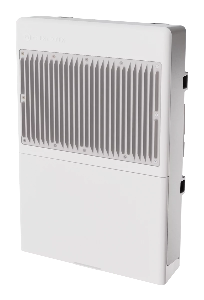

netPower Lite 8P (CSS610-8P-2S+OUT)
Safety Warnings
Before you work on any equipment, be aware of the hazards involved with electrical circuitry, and be familiar with standard practices for preventing accidents.
Ultimate disposal of this product should be handled according to all national laws and regulations.
The Installation of the equipment must comply with local and national electrical codes.
This product is intended to be mounted outdoors on a pole. Please read the mounting instructions carefully before beginning installation. Failure to use the correct hardware and configuration or to follow the correct procedures could result in a hazardous situation for people and damage to the system.
Use only the power supply and accessories approved by the manufacturer, and which can be found in the original packaging of this product.
Read the installation instructions before connecting the system to the power source.
We cannot guarantee that no accidents or damage will occur due to the improper use of the device. Please use this product with care and operate at your own risk!
In the case of device failure, please disconnect it from power. The fastest way to do so is by unplugging the power plug from the power outlet.
It is the customer's responsibility to follow local country regulations, including operation within legal frequency channels, output power, cabling requirements, and Dynamic Frequency Selection (DFS) requirements. All Mikrotik devices must be professionally installed.
Quickstart
Please follow these quick steps to set up your device:
- Download the latest version of SwOS Lite software from https://mikrotik.com/download;
- Connect your computer to one of the Ethernet ports;
- Connect the device to the power supply;
- Set the IP address of your computer to 192.168.88.2;
- Open your web browser, the default IP management address is 192.168.88.1, with username: admin and no password (or, for some models, check user and wireless passwords on the sticker);
- Upload a file with the web browser in the Upgrade tab, the device will reboot after the upgrade;
- Set your password to secure your device.
Expansion slots and ports
- Gigabit Ethernet: eight ports.
- PoE-out ports: Ether1-Ether8, 802.3af/at
- Low voltage PoE-Out current limit: 1.0 A.
- High voltage PoE-Out current limit: 0.64 A.
- Total output power: 120 W.
- Low voltage PoE-Out current limit: 1.0 A.
- 10G SFP+ ports: two.
- Number of DC inputs: 3 (2-pin terminal).
- 2-pin terminal input Voltage: 24-57 V.
- 2-pin terminal input (Battery) Voltage 22-30 V.
- 2-pin terminal charging (Battery) Voltage 20-31.7 V.
- Max power consumption: 208 W.
- Max power consumption without attachments: 7 W.
- External Temperature sensor: 3-pin terminal.
- Cooling type: Passive.
Battery Charger Description
The battery charger does not offer any provision of battery balancing or precise individual cell voltage or temperature monitoring. The user is responsible for connecting a suitable battery management system (BMS) that equalizes the individual cells and protects them from abnormal and unsafe conditions, such as abnormal temperatures, charging voltages or charging currents. This is critical for the use of lithium battery chemistries or when connecting any batteries in parallel.
The CSS610-8P-2S+OUT charger subsystem is designed for charging batteries through the 2-pin header in a current range of 0.2A .. 1.6A, at a voltage of 20-31.7 V
This allows for the use of battery configurations with a nominal voltage in the region of 24V. Among others, the battery can be a a series connection (2S1P) of two batteries of the following chemistries:
- 12V flooded lead acid.
- 12V absorbent glass mat lead acid (AGM).
- 12V gel based lead acid.
- 12V LiFePO4 battery.
Battery Charger Parameters
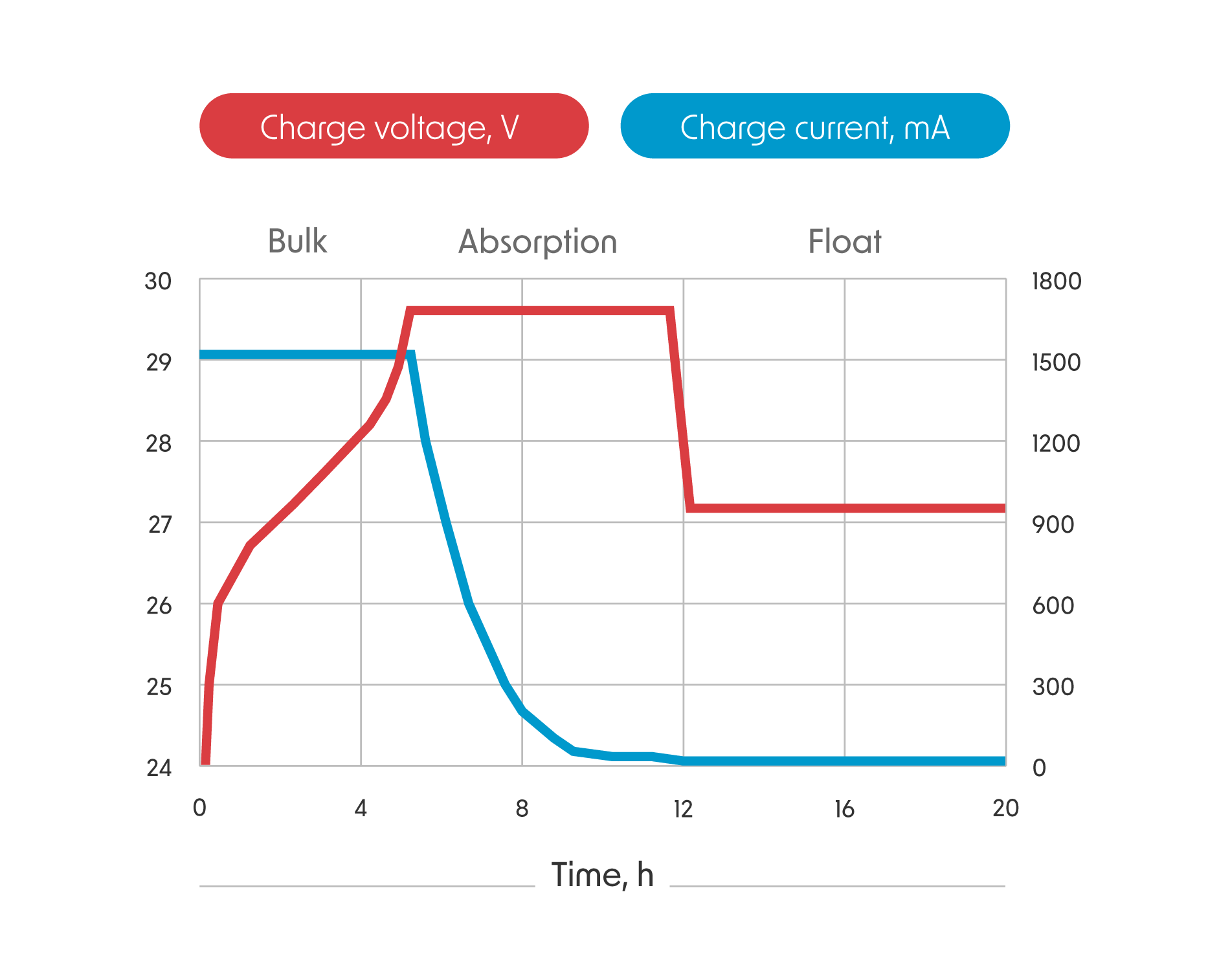
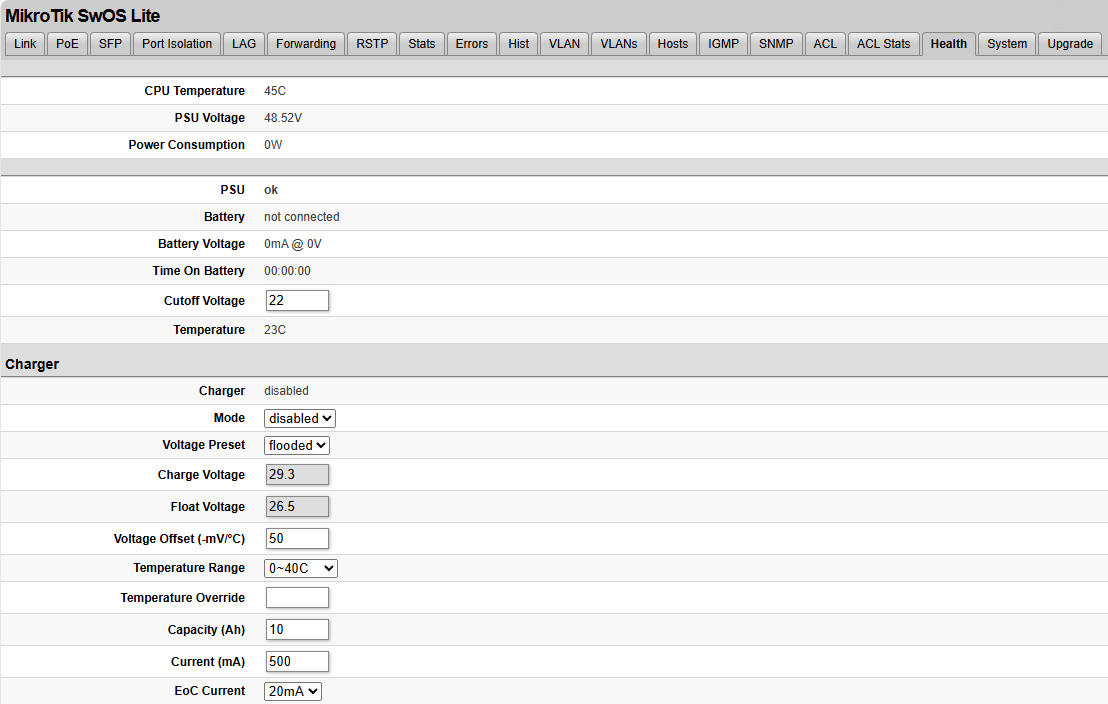
The battery charger is configured under the SwOS Lite Health tab. The charger operates in 3 steps- the bulk, absorption and float phases, which are configured by the charger parameters.
Voltage Preset allows for the selection of pre-defined float and charge voltages for the 4 relevant battery chemistries or, optionally, setting custom thresholds for the Charge and Float voltages.
The Current (mA) field allows setting the current at which the battery is charged during the bulk phase. During this phase, the battery voltage rises.
The Charge Voltage is the voltage at which the constant voltage is held in the absorption phase. During this phase, the battery current starts to decrease.
The EoC Current (End of Charge current) is the current at which the battery charger exits absorption and enters the float phase, relaxing to the float voltage.
The Float Voltage is the voltage at which the battery is held for some time, depending on the charger mode.
The EoC Current parameter values depend on the battery Capacity (Ah).
A 0.05C EoC Current value corresponds to a current that would charge the given battery capacity in 1/0.05C=20 hours. In other words, a 10Ah battery would have a 0.05C EoC current of 500mA.
There is a safety timer which will automatically enter the float phase if the battery has not finished the absorption phase in time. If the battery has not reached the EoC current in (Capacity/ Current)+30% minutes, the battery will end absorption and enter the float phase, if applicable.
As an example, a 10Ah capacity battery charged with a 1000mA charge Current setting will enter the float phase automatically in 780 minutes or 13 hours.
The charger can be set to disabled or to one of three charging modes that impact the float behavior:
| Standby | 2 · Capacity (Ah) hours and remains active until blocked or reset | Lead-acid batteries that are rarely cycled and must always be charged to their full capacity to be ready for a UPS application. The charge voltage is typically lower |
| Cyclic | 2 · Capacity (Ah) hours and remains disabled until reaching the self-discharge cutoff | Lead-acid batteries that are frequently cycled, but power is not available consistently, such as in a solar application. The charge voltage is slightly raised as there will not be time to fully float the battery |
| No-float | Remains disabled until reaching the self-discharge cutoff. | Lithium batteries or other chemistries that are not meant to be float charged. |
All three modes have the same absorption phase timeout. The self-discharge cutoff is 23.2V or the Cutoff Voltage parameter, whichever is highest. The Cutoff Voltage can be set to a maximum of 26V.
When re-enabling the charger, it can take up to a minute before charging starts. The battery current and voltage is displayed in the Health tab. In case the connected DC supply browns out or has fluctuating power, the charger might prevent charging with the unstable power status.
To prevent the charging of batteries at unsafe temperatures, the user can use the supplied temperature sensor.
The battery will not charge unless the sensor reads a value within the Temperature Range. This is set to 0°.. 40°C by default or can be extended to -15°.. 50°C by the user.
In case the battery temperature is monitored and the batteries protected by some other means, the temperature can be overridden with the Temperature Override.
To prolong the life of lead acid batteries, the user can reduce the charge voltage down with higher battery temperatures. Conversely, the voltage is raised at lower temperatures. The center point around the adjustment is 25°C.
The Voltage Offset (-mV/°C) allows to fine-tune this adjustment. For instance, a value of 50 will lower the Charge Voltage and Float Voltage by 0.5V at 35°C.
In case this function is not used, the adjustment can be set to 0mV/C.
It is dangerous to raise the Charge Voltage for Lithium battery chemistries. The adjustment must be set to 0 in this case!
To control the battery depth of discharge, the parameter Cutoff Voltage can be used in the SwOS Lite Health tab.
Once the battery reaches the cutoff voltage, the system disconnects PoE-Out power and networking functions and enters a low-power state. The board will not be reachable at this state.
The board will exit the low-power state once a stable DC supply is reconnected or the battery is above the cutoff voltage and manually reconnected to the terminal. This is to prevent indefinite power-cycling due to reconnecting PoE-Out loads.
Connecting a Suitable Battery
Firstly, follow the manufacturer guidelines on connecting the battery modules in the correct polarity with the battery management system and/ or cell balancer, if used.
Afterwards, connect the battery polarity outputs according to the green battery terminal marked "UPS Battery" in the picture below. Use the 5.08mm pitch 2-pin terminal header provided with the product. Dress the terminal connection well and be careful of shorting the battery at the terminal.

Under full load of 120W Poe-Out output power and a 24V battery, average discharge currents of 6A can be expected.
Depending on the wire inductance and length, a current spike and voltage drop may be seen when switching over to the battery. To improve UPS stability, it is recommended to keep the battery wires below a length of 3m and to have at least a 4mm2 cross-section. Longer or thinner wiring can be feasible if the full PoE-Out budget is not utilized.
Connecting the Temperature Sensor
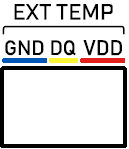
Use the provided 3.5mm pitch 3-pin header to connect to the sensor port marked "EXT TEMP" in the picture above. Connect the wires according to the table below. Make sure that the 3-pin header has good contact with the wire and not the insulation.
Make sure that the sensor is correctly wired, when connecting to the device. Incorrect wiring may damage the sensor.
| − (GND) | Blue |
| DQ | Yellow |
| + (VDD) | Red |
Consult the battery manufacturer documentation on where best to measure battery temperature. If not specified, generally it should be at mid-height of the batteries, in between units. Best results can be achieved by fixing the sensor head to the battery and applying thermal paste or grease for better thermal contact with the battery case.
Refrain from estimating temperature at the battery terminals or top-side face, as this would provide lower temperatures.
The temperature sensor wires can be extended, if necessary.
The temperature sensor is based on the DS18B20 and is compatible with the OneWire protocol.
Prolonging Battery Lifetime
The most damaging usage of a battery is charging and discharging the battery at high currents at extreme temperatures and overtly high and low voltages.
Conversely, to prolong the useful battery lifetime, measures must be taken to control these conditions to within manufacturer recommendations.
Battery Temperature
For all battery chemistries, storage and operating temperature is essential. Reducing the battery storage temperature from 40°C to 20°C can increase battery float charging life time by a factor of 4x in some lead acid chemistries.
At lower temperatures, especially near 0°C, most battery chemistries lose useful capacity and become dangerous to charge once near freezing.
To counteract some of the problematic effects, temperature compensation through the external sensor can be used for lead acid chemistries. The necessary compensation (mV/°C) should be found in the manufacturer accompanying documents.
The most beneficial measure is ultimately to provide a safe, consistent storage environment for the battery.
Battery Currents and Voltages
The manufacturer specified battery capacity is typically measured at some specified discharge current. Increasing the discharge rate will then reduce the useful battery capacity from the discharge, as well as increasingly stress the battery.
As a rule of thumb, battery discharge rates are specified as a function of their capacity (the C-rate). It may be the case that using higher capacity batteries will stress them less for a given UPS load.
There is no general guideline on the minimal charging current/ maximum battery capacity. Since the charger is current-limited to 1.6A, it may be difficult to estimate battery behavior and state of charge if 1.6A corresponds to less than C/20. It is therefore not advised to use batteries with capacities larger than 30Ah.
For charging and float voltages, consult the manufacturer specifications. Overcharging lead acid batteries will result in the release of hydrogen gas inside the cell or environment, while overcharging lithium batteries can result in an explosion hazard. The use of a battery management system to safeguard charging is strongly recommended.
Generally, lead acid batteries that are not fully charged may develop sulfation over time, reducing battery health. Conversely, lithium batteries that are stored at 100% state of charge indefinitely have a shorter lifespan than when stored at 50%.
Discharging the batteries by more than 80% of their rated capacity is taxing to the cells. In lead acid chemistries, reducing the degree of discharge to just 30% will lead to gains in cycle life of more than 100%!
To control the battery depth of discharge, the parameter Cutoff Voltage can be used in the SwOS Lite Health tab. The actual battery voltage also naturally sags in response to increasing discharge currents and tends to relax once the load is removed.
The selection of a suitable battery capacity and appropriate loading is not straightforward as cost, system reliability and size must be taken into account.
Battery Maintenance
Follow manufacturer guidelines for proper care of the installed cells. These may include checking battery voltages, cleaning vent seals and inspecting signs of corrosion.
In particular, flooded construction lead acid batteries need to be replenished with distilled water.
It is good practice to examine the installed batteries every month and evaluate their state so that they are reliable when needed in a UPS application.
If not using a BMS with battery equalization, the individual cells may need to be equalized. Follow manufacturer guidelines for this procedure.
External Temperature sensor connection
Use the three-pin connector included in the kit to connect the external temperature sensor to the 3-pin terminal.
Ensure that the wire colors match the corresponding port colors on the terminal, as indicated by the labels on the device housing.
The temperature reading can be found under the "Health" tab in SwOS Lite.
Configuration
The device can be discovered using WinBox utility, by clicking on the Neighbors list. The default management address is 192.168.88.1.
SwOS Lite is a simple software designed for the switch. We suggest starting here to get yourself accustomed to the possibilities: https://help.mikrotik.com/docs/spaces/SWOS/pages/76939305/CSS610+series+Manual.
For recovery purposes, it is possible to boot the device for reinstallation, see section Buttons and Jumpers.
Powering
The device accepts power in three following ways:
- DC1: 2-pin terminal accepts 24-57 V DC⎓.
- DC2: 2-pin terminal accepts 24-57 V DC⎓.
- Battery output voltage: 20-31.7 V DC⎓.
The power consumption under maximum load can reach 7 W, with attachments 29 W.
Power output
The device supports PoE-OUT 802.3af/at from Ethernet ports Ether1-Ether8.
Bottom Lid
- The bottom lid is secured in place with the captive screw, it can be unscrewed by hand, but do not remove the screw completely.
- Pull the cover towards.
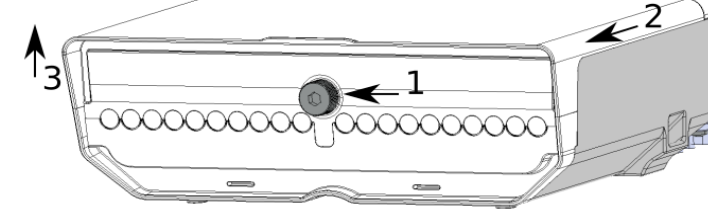
- Lift to access Ethernet ports.
Mounting
The device can be mounted in several ways: pole, wall, or ceiling. The package also includes a drill hole template with detailed mounting instructions, to help you with the drill hole marking. The device has eight mounting points for versatility use zip ties or steel clamps for mounting on the pole.
The IP rating scale for this device is IP54. When mounting outdoors, please ensure that any cable openings are directed downwards.
Mounting points:
- There are eight mounting points on the back of this device. Choose the most relevant ones.
- Middle points are designed for mounting on the mast, there are curves on the case for slim fitment.
It's recommended to secure Ethernet cable to the pole using zip ties. With the distance from the device approximately 30 cm.
The device must be mounted by UP arrow facing upwards.
The installation infrastructure (towers and masts), as well as the router itself, must be properly grounded. The device includes a grounding wire attachment screw on the backside.
- Attach your grounding wire to the grounding screw.
- Attach the other end of the grounding wire to the grounded mast.
Mounting and configuration of this device should be performed by a qualified person.
Mounting on the mast or pole:
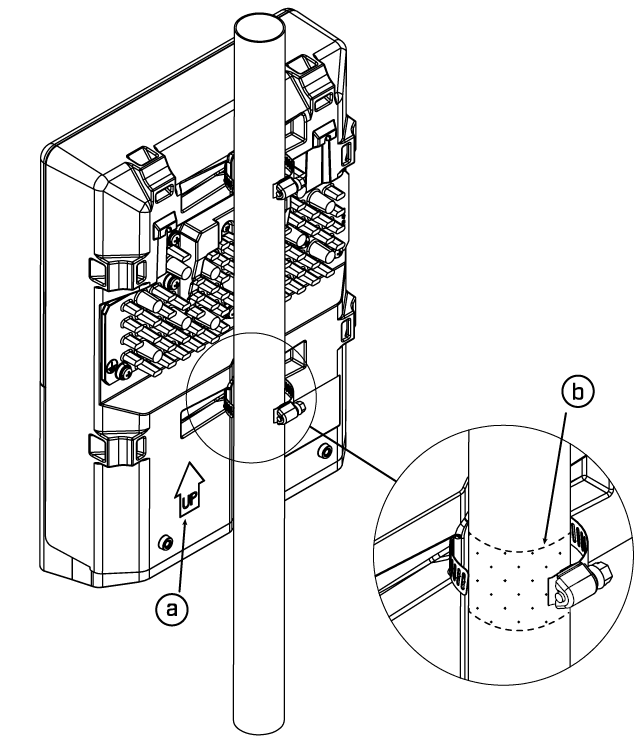
- Insert provided steel clamps into mounting spots.
- Attach the unit to the mast.
- Align the device and secure it by tightening steel clamps with a PH2 screwdriver.
- Guide Ethernet cables through the opening and connect to the Ethernet ports.
- Close bottom latch and secure with a screw.
A - Always make sure to place the unit in an upwards position.
B - It's recommended to use electrical tape to increase friction between materials.
Mounting unit on the wall:
- Use included a template to mark spots for drilling holes. Align accordingly, it will depend on how the device will be mounted finally.
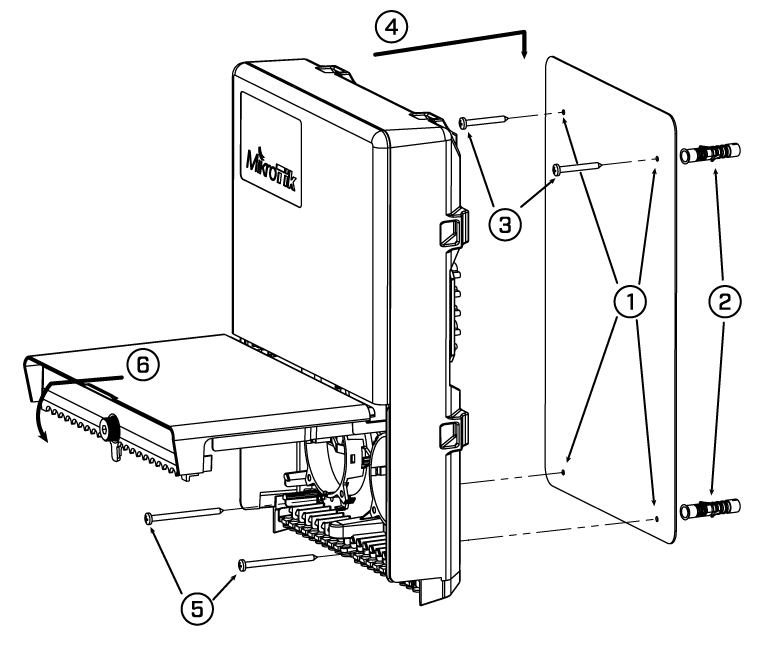
- Insert dowels if needed, depends on wall structure and material.
- Insert screws and screw them by leaving approximately 1 cm out.
- Attach the unit to the position.
- Use screw holes under the bottom cover and tighten to secure in place. Extend your Ethernet cables through the openings and connect to Ethernet ports.
- Close bottom latch.
Carefully check the wall for electric cables before drilling mounting holes.
Buttons and jumpers
Hold this button during boot time until the LED light starts to flash. Release the button to reset SwOS configuration and load backup software for reinstallation and upgrade.
Accessories
The package includes the following accessories that come with the device:
- Two Hose Clamp SUS304.
- K-66 fastening set.
- External temperature sensor.
- OED-drill-template, paper brochure.
Operating system support
The device supports SwOS Lite software. Other operating systems have not been tested.
To avoid pollution of the environment, please separate the device from household waste and dispose of it in a safe manner, such as in designated waste disposal sites. Familiarize yourself with the procedures for the proper transportation of the equipment to the designated disposal sites in your area.